Subscriptions and refunds tell you a lot about how a customer's journey is going; they can be the perfect moment to reach out, or the moment to wrap things up. Keeping on top of all that manually isn't realistic, which is where workflows come in, especially with the Subscription and Refund triggers.
With these, you can set up full workflows that kick in the moment a contact's status changes. To get started, add a new trigger; you'll find both options under Payments.

Both triggers start the same way; pick one, then click Add Filters to get as specific as you need. Here's where the two diverge.
For Subscription, the main filters are Status and Global Product. The steps appear in this order:
- Field: Select what you want to filter by, for example, a status or a global product.
- Operator: Choose whether the field is or isn't what you're about to specify.
- Value to meet: Set your status or product, for example, active or cancelled.

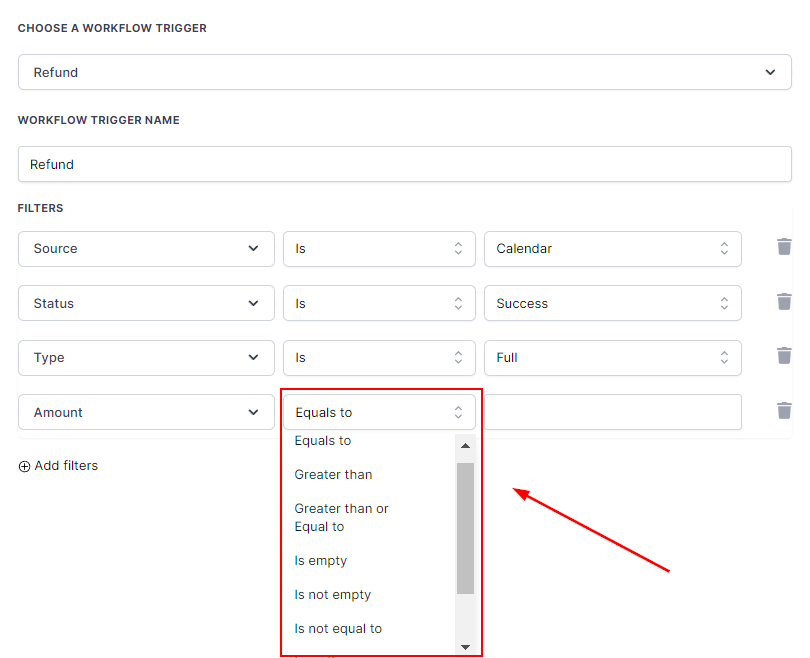
For Refunds, the main filters are Amount, Source, Status, and Type. They work the same way as the Subscription filters, except for Amount. In that case, the operator has more options, and the value is a free-text field rather than a drop-down menu, so you can enter the exact total.
Once you've set your filters, save your action and you're ready to go. You can use these automation triggers to create nurture campaigns, clean up your lists, track the state of refunds, and more.