Built for Round Robin calendars and the Neo widget type, the Staff Member Selection feature adds a dropdown to the booking widget so clients can choose a specific staff member for their appointment. It gives clients more control and improves satisfaction across a range of industries.
Benefits of Staff Member Selection
- Increased Customer Satisfaction: Clients can choose who they see, making the experience more personal and comfortable.
- Improved Efficiency: Simplifies the booking process and cuts down on last-minute changes after the initial booking.
- Better Customer Retention: When clients have a great experience with a particular team member, they're more likely to rebook, which builds loyalty.
- Improved Business Reputation: Shows clients you put them first, which strengthens your reputation.
How to Activate Staff Member Selection
Access Calendar Settings
Go to Calendar Settings by selecting "Calendars" then "Calendar Settings" in the CRM. Alternatively, head to "Settings" and select "Calendars."

Create or Edit a Round-Robin Calendar
Click the pencil icon on the Round-Robin calendar you want to edit. You can also create a new Round-Robin calendar here.

User Selection
Use the dropdown menu to select the staff members you want to assign to the calendar.

Contact Routing Preference
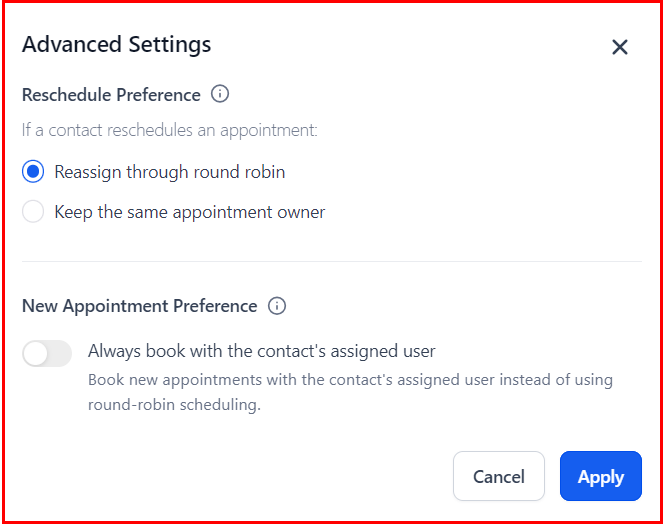
Choose how appointment owners are assigned for new and rescheduled appointments.

Reschedule Preference
You can decide who gets assigned when a contact reschedules via the booking widget:
- Reassign through round-robin scheduling.
- Keep the same appointment owner each time, so the same user is always assigned to the rescheduled appointment.
New Appointment Preference: Always Book with the Contact's Assigned User
This lets you book new appointments with the contact's assigned user rather than using round-robin scheduling. You can choose whether the contact is always booked with the same user whenever a new appointment is scheduled.
For this to work, the form needs to be first in the booking widget order. You can reorder it from the Forms & Payments tab.
Allowing Staff Selection
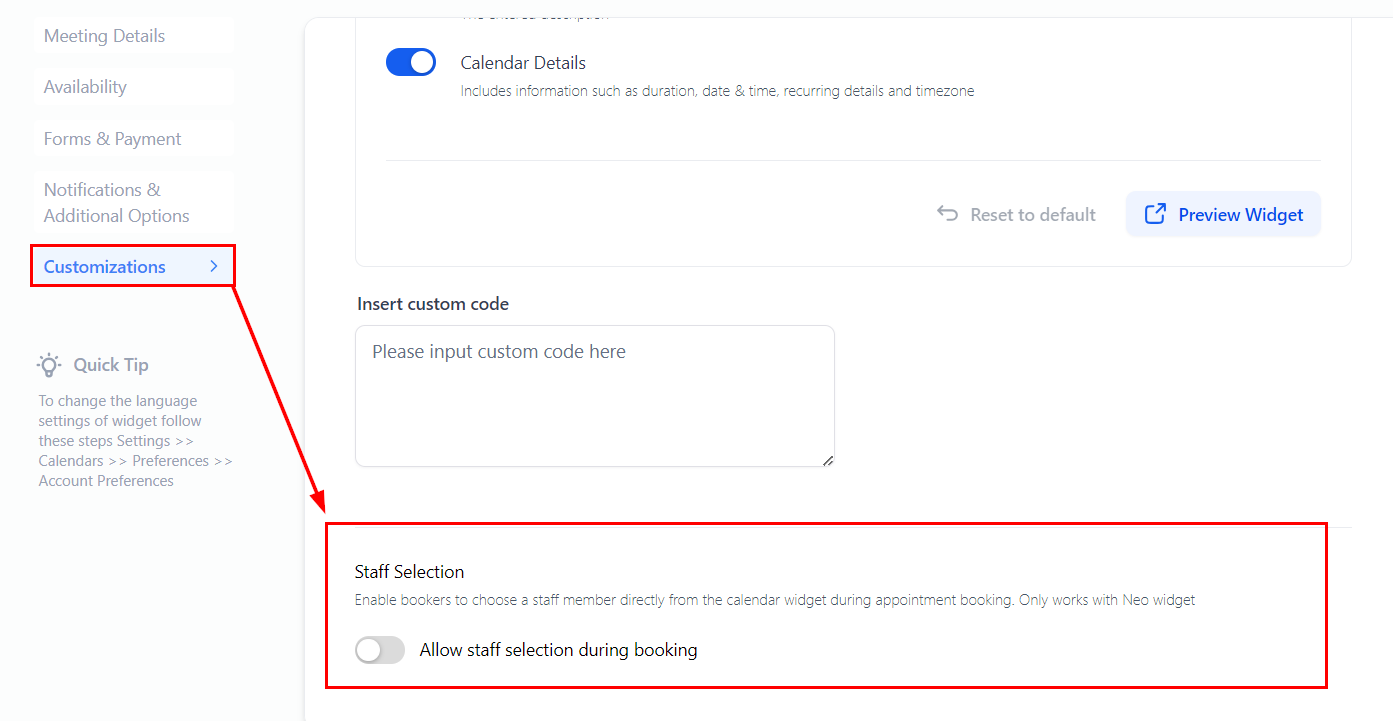
To let contacts choose their preferred staff member, go to the "Staff Selection" option within the Calendar customisations and toggle the switch.
Rescheduling with Staff Member Selection
Internal Rescheduling
From the contact's appointments tab, or the Appointments tab in the Calendars menu, select a different staff member.

Client Rescheduling
Clients receive a rescheduling link and can choose a different staff member when they reschedule.

Staff Member Selection gives clients more control, makes bookings smoother, and improves satisfaction. Done well, it builds loyalty and strengthens your reputation as a client-focused business.